What Happens to Smart Home Devices When Internet Goes Down
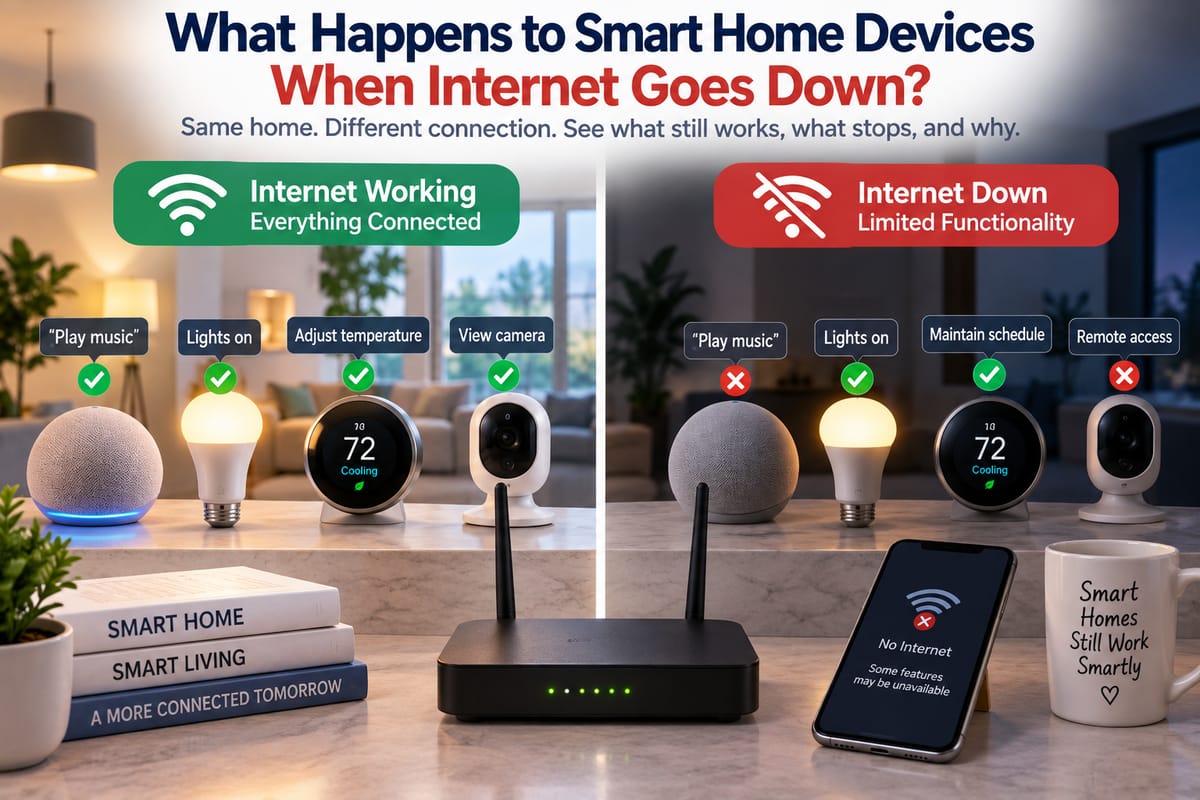
What Happens to Smart Home Devices When Internet Goes Down
Smart home devices are designed to make everyday life more convenient. Lights can respond to voice commands, thermostats can adjust temperatures automatically, cameras can send alerts, and smart locks can provide remote access. But many homeowners discover an important question when their internet connection suddenly stops working: What happens to all those connected devices when the internet goes down?
The answer depends on the type of device, how it communicates, whether it relies on cloud services, and how the smart home network is configured.
Some devices may continue working normally over the local network. Others may lose remote controls or cloud-based features. Some may become almost completely unavailable until the internet connection returns.
Understanding these differences can help homeowners choose devices more carefully and design smart homes that remain useful during internet outages.
Internet, Wi-Fi, and Smart Home Networks Are Not the Same Thing
One of the most important distinctions is between the internet and the local home network.
The internet is the external network that connects a home to online services and remote systems.
Wi-Fi is a wireless networking technology that allows devices to communicate with a local router or access point.
A smart home network can include Wi-Fi devices as well as products that communicate through other technologies.
This means an internet outage does not necessarily mean that the local network has stopped working.
If the router and Wi-Fi system remain powered on, two devices inside the home may still be able to communicate with each other even though the household cannot reach online services.
The relationship between these technologies is explored in How Wi-Fi Connects Smart Home Devices and Affects Reliability.
Some Smart Devices Can Keep Working Without Internet
Not every smart home function requires an internet connection.
A device may continue operating locally when:
- Its basic controls are stored on the device
- Automation rules run locally
- The controlling app communicates over the local network
- A smart hub processes commands locally
- The device does not depend on a cloud service for its core functions
For example, a smart light connected to a local hub might still respond to a local switch or automation even when the internet is unavailable.
A thermostat may continue following a previously programmed temperature schedule.
A smart speaker, however, may lose certain voice commands if those commands need to be processed by an online service.
The key issue is not simply whether a device is “smart.” It is where the device’s intelligence and control functions actually operate.
What Happens to Smart Lights?
Smart lighting is often relatively resilient, but behavior varies by product.
A connected bulb may continue to receive power and function as a basic light during an internet outage. However, advanced features may stop working.
Depending on the system, you may still be able to:
- Turn lights on or off using a physical switch
- Use locally stored automations
- Control devices through a local hub
- Adjust certain settings through local communication
You may lose:
- Remote control from outside the home
- Cloud-based automation
- Some voice commands
- Online integrations
- Certain app features
If the smart lighting system depends entirely on a cloud service, functionality may be more limited.
What Happens to Smart Thermostats?
Smart thermostats can behave differently during an outage.
Many thermostats are capable of maintaining previously configured temperature settings even when their internet connection disappears.
The heating or cooling system may therefore continue operating according to its existing schedule.
However, internet-dependent functions can become unavailable, including:
- Remote temperature adjustments
- Smartphone notifications
- Weather-based features
- Cloud-based scheduling
- Remote monitoring
For homeowners, this distinction is important because maintaining basic temperature control may be possible even when remote convenience features are temporarily unavailable.
What Happens to Smart Cameras?
Security cameras are among the devices most affected by internet outages.
Many modern cameras rely on cloud infrastructure to provide features such as:
- Remote video access
- Cloud video storage
- Smartphone notifications
- Remote configuration
- Cloud-based object detection
If the internet connection goes down, a cloud-dependent camera may stop sending footage to its online service.
However, some cameras offer local storage through:
- microSD cards
- Network video recorders
- Local servers
- Home security hubs
A camera with local recording may continue capturing video even when the internet is unavailable, although remote access and notifications may stop.
This is an important consideration when choosing smart security equipment.
What Happens to Smart Locks?
Smart locks can be particularly important during an internet outage because homeowners may still need to enter or secure their homes.
Many smart locks provide multiple methods of access, such as:
- Physical keys
- Keypads
- Bluetooth
- Local wireless connections
- Fingerprint recognition
- Smartphone applications
If a lock supports local communication or physical controls, those functions may continue during an internet outage.
However, remote unlocking from another location may stop working if it requires cloud connectivity.
The exact behavior depends heavily on the lock’s architecture and how it communicates with the rest of the smart home.
What Happens to Smart Speakers?
Smart speakers often rely heavily on internet-connected services.
Voice commands may be processed remotely, which means an internet outage can prevent features such as:
- Online music streaming
- Web searches
- Weather information
- Cloud-based voice commands
- Remote smart home controls
- Online information requests
Some local device controls may continue to work, particularly when the speaker and smart devices support local communication.
However, homeowners should not assume that every voice assistant will remain fully functional without internet access.
What Happens to Smart Plugs?
Smart plugs can either remain useful or become limited depending on how they are designed.
A basic schedule stored locally may continue operating.
For example, a plug programmed to turn a lamp on at a particular time might continue following that schedule.
But if the plug depends on a cloud service for every command, app-based control may stop during an internet outage.
This is why product specifications should be examined before assuming that a smart device will function offline.
Cloud-Based Versus Local Smart Homes
One of the most important concepts in smart home reliability is the difference between cloud-based and local control.
Cloud-Based Control
In a cloud-dependent system, commands and automation may pass through online servers.
The general path can look like:
Phone → Internet → Cloud Service → Smart Device
If the internet connection fails, the communication path may be interrupted.
Local Control
In a locally controlled system, devices can communicate within the home.
The path might look more like:
Phone → Home Network → Smart Hub → Smart Device
The internet may not be required for that particular command.
Local control can therefore provide greater resilience during internet outages, although the actual behavior depends on the specific devices and software.
The Role of Smart Home Hubs
Smart home hubs can play an important role in keeping devices connected.
A hub can act as a central point that communicates with different smart devices and manages automation rules.
Depending on the platform, a hub may support local processing, allowing some automations to continue without an internet connection.
For example, a local automation might instruct a motion sensor to trigger a light without sending the entire process through an external cloud service.
However, not every hub provides the same level of offline functionality.
Some systems depend heavily on cloud services despite having a physical hub.
Smart Home Protocols Can Affect Offline Behavior
Smart home devices use different communication technologies and protocols.
These may include:
- Wi-Fi
- Bluetooth
- Zigbee
- Z-Wave
- Thread
- Other proprietary technologies
The protocol itself does not automatically determine whether a device works without internet. The overall system architecture matters.
A device might use a local wireless protocol but still rely on cloud services for certain features.
Conversely, a system may use local communication and process automation entirely within the home.
Understanding these relationships is part of Understanding Smart Home Integration and Compatibility.
What Happens to Automations?
Automations are among the most useful smart home features, but they can also be affected by an internet outage.
Consider an automation such as:
If motion is detected after sunset, turn on the hallway light.
If the automation is stored and processed locally, it may continue functioning.
If the automation requires a cloud service, it may stop until the internet connection returns.
Other examples include:
- Turning lights on at a scheduled time
- Adjusting thermostat settings
- Activating security devices
- Closing smart blinds
- Triggering scenes
- Running morning routines
When purchasing smart home products, it is useful to determine whether important automations can run locally.
What Happens When Wi-Fi Goes Down but Internet Still Works?
There is another situation that can be confusing.
A home’s internet connection may be functioning while the Wi-Fi network is unavailable.
For example, a router’s internet connection might still be active, but a Wi-Fi access point could fail.
In that situation, Wi-Fi-dependent devices may become unreachable even though the home technically still has internet access.
This demonstrates why smart home reliability involves several layers:
Device → Local Network → Router → Internet → Cloud Service
A failure at any point can affect certain features.
What Happens When the Router Loses Power?
If the router or Wi-Fi equipment loses power, local network communication can also stop.
That can affect devices that depend on the network for local control.
Some battery-powered smart devices may remain operational but become unable to communicate with other devices.
A smart lock, sensor, or thermostat may continue performing its basic function while losing access to network-based features.
For critical devices, backup power can therefore be worth considering.
A battery backup or uninterruptible power supply can keep networking equipment operating during short power interruptions.
Smart Home Networking Matters
A reliable smart home depends on more than having a fast internet connection.
The local network needs to provide appropriate:
- Coverage
- Capacity
- Device compatibility
- Security
- Reliability
- Network segmentation where appropriate
A home with dozens of connected devices may place considerably more demand on its networking equipment than a home with only a few smart lights.
The Complete Guide to Smart Home Networking provides broader information about how networking infrastructure supports connected-home devices.
How to Make a Smart Home More Resilient
Homeowners can take several steps to reduce the impact of internet outages.
Choose Devices With Local Control
When shopping for smart home products, check whether important features can operate locally.
Look for information about:
- Local processing
- Offline automations
- Local control
- Local storage
- Hub-based operation
Keep Physical Controls Where Practical
Smart technology does not necessarily have to eliminate traditional controls.
A physical light switch, mechanical key, or manual control can provide an important backup when technology becomes unavailable.
Use Local Storage for Important Security Footage
If security recordings are important, consider systems that offer local recording in addition to cloud storage.
This can provide another way to retain footage when internet connectivity is interrupted.
Protect Networking Equipment From Power Interruptions
A backup power supply can keep a router, hub, or network equipment running during short outages.
This is particularly useful if local automation is an important part of the smart home.
Understand Each Device’s Failure Mode
Before installing a device, ask:
- What happens if the internet goes down?
- What happens if Wi-Fi stops working?
- What happens if the cloud service is unavailable?
- Can the device be controlled locally?
- Does it have physical controls?
- Can important automations run offline?
- Where is data stored?
These questions can reveal potential weaknesses before they become real problems.
Does a Smart Home Stop Being Smart Without Internet?
Not necessarily.
An internet outage may remove many convenient features without completely disabling the smart home.
A locally controlled system may continue performing important automations, while cloud-dependent features temporarily disappear.
For example, a homeowner might still be able to operate lights and maintain a thermostat schedule but lose remote smartphone access, online music, cloud notifications, and remote camera viewing.
The difference comes down to architecture.
A smart home built around local communication and processing can remain useful even when its connection to the wider internet disappears. A system that depends heavily on cloud services may become considerably more limited.
Building a Smart Home That Can Handle Outages
The best way to prepare for internet outages is to understand which parts of a smart home depend on the internet and which operate locally.
The Complete Guide to Smart Homes provides a broader look at the technologies, devices, networks, and systems that make connected homes possible.
When reliability matters, homeowners should look beyond individual device features and consider the entire system. Local control, compatible devices, reliable networking, physical backups, local storage, and appropriate power protection can all contribute to a more resilient setup.
An internet outage does not have to turn a smart home into an ordinary one. With thoughtful system design, many essential functions can continue operating while the home’s connection to the outside world is temporarily unavailable.